

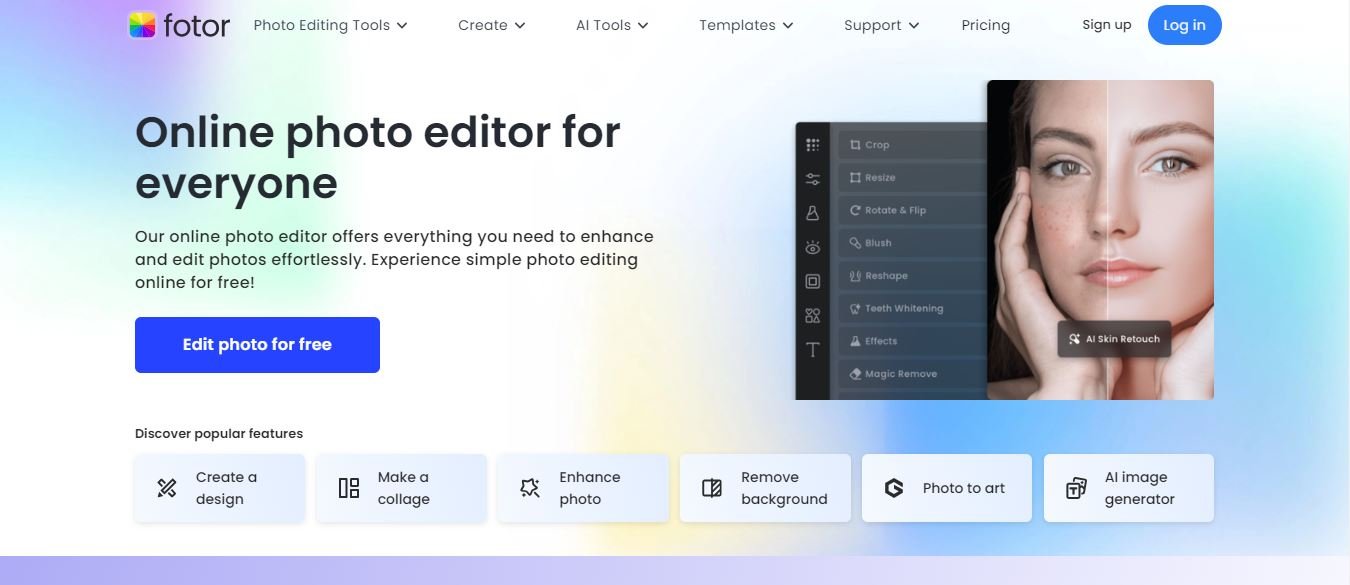
In the digital age, visual content remains paramount for anyone sharing ideas online, building a personal brand, or running an enterprise. Whether you are a professional photographer managing tight deadlines, a freelance graphic designer putting together client assets, or simply a social media enthusiast aiming to polish a weekend snapshot, having access to a reliable and efficient digital workspace is essential. Fotor has emerged as a widely adopted choice for millions of creators worldwide, offering a balanced mix of traditional editing controls and modern automated assistants. This comprehensive review delves into the various aspects of the platform, highlighting its core strengths, workflow capabilities, subscription structures, and potential limitations to help you decide if it fits your creative routine.
User Interface and Cross-Platform Experience
Fotor provides a clean, intuitive layout designed to make digital editing accessible across web browsers, desktop computers, and mobile devices.
From the moment you land on the platform interface, navigating through the various tools, sidebars, and feature menus feels remarkably straightforward. Whether you are editing a high-resolution image on a laptop during office hours or touching up a smartphone snapshot while commuting, the visual design stays consistent and responsive. This cross-platform compatibility ensures that users can start a project on one device and seamlessly continue working on the go without being tied to a single physical workstation. The dashboard eliminates unnecessary clutter, placing the most frequently used buttons right where your eyes naturally look first, which significantly shortens the learning curve for absolute beginners. Furthermore, user account synchronization ensures that templates, uploaded assets, and work-in-progress drafts remain securely saved and accessible regardless of whether you log in from a Mac, Windows PC, or mobile tablet.
Beyond basic menus, the workspace offers customizable layout panels that allow experienced users to arrange tools according to their personal preference. Keyboard shortcuts are supported for rapid navigation, helping power users fly through repetitive retouching tasks with maximum efficiency. The responsive design adapts smoothly to different screen resolutions, preventing awkward clipping or hidden toolbars even on smaller laptop displays. By prioritizing a distraction-free canvas, Fotor lets creators focus entirely on the visual composition rather than fighting with complicated software controls.
Core Photo Editing Capabilities: Basic vs. Advanced Tools
Fotor successfully balances quick, everyday adjustments with precise professional controls to accommodate creators of all different skill levels.
For quick fixes and minor corrections, the basic editing suite includes essential functions like crop, rotate, resize, straighten, and direct brightness or contrast manipulation. A convenient one-click enhance feature gives beginners an immediate way to boost overall image quality without digging through complicated menus or adjusting exposure levels manually. For experienced editors and shutterbugs who need deeper control, advanced options include precise tone curve adjustments, color grading sliders, and high dynamic range effects that pull out hidden details buried within dark shadows and blown-out highlights. Portrait photographers also benefit immensely from specialized beauty retouching tools that handle blemish removal, skin smoothing, teeth whitening, and redeye correction with high precision.
The non-destructive editing environment ensures that original image files remain untouched, allowing users to experiment freely with filters, vignettes, and artistic overlays without permanent pixel damage. Detailed histograms and RGB channel mixers give technical users the analytical feedback required to achieve exact color balance in challenging lighting conditions. Whether correcting a poorly lit indoor family portrait or grading a moody landscape photograph, these versatile foundational tools handle everyday pixel adjustments with dependable accuracy.
The Role of AI in Modern Fotor Workflows
Modern artificial intelligence features have completely transformed Fotor from a traditional pixel manipulator into an intelligent creative suite.
Tasks that once took tedious hours of manual masking, such as cutting out a complex human subject from a busy background or erasing unwanted stray objects from a street scene, now take just seconds using automated smart detection algorithms. Batch processing allows commercial users and online store managers to apply uniform filters, dimension resizes, or custom watermarks across dozens of image files simultaneously, which drastically cuts down production time. Furthermore, smart generation tools let users expand images or replace visual elements using simple text prompts. Maintaining consistent visual standards across digital channels is crucial, much like how creators apply creative editing techniques for eye-catching YouTube shorts to capture viewer attention on fast-moving video platforms.
AI-powered upscaling tools also breathe new life into low-resolution archive pictures by intelligently filling in missing details without introducing pixelation or harsh artifacting. Smart lighting correction algorithms analyze underexposed or backlit frames instantly, balancing high-contrast regions automatically so human faces emerge clearly from deep shadows. These intelligent automations remove the tedious grunt work from digital workflows, empowering hobbyists and busy professionals alike to achieve polished, commercial-grade results in a fraction of the usual time.
Templates and Graphic Design Tools
Beyond standard photo touch-ups, Fotor functions as a complete graphic design platform packed with a wide array of ready-to-use templates.
Users can quickly build engaging social media graphics, promotional flyers, event posters, YouTube banners, and mood boards using simple drag-and-drop mechanics. The built-in collage maker provides flexible layouts for combining multiple family photos or product shots into a single cohesive frame without alignment headaches. Every template allows deep customization of fonts, background colors, and vector graphics, making it easy to tailor layouts to specific brand guidelines or personal aesthetic styles. Whether you are launching a marketing campaign or designing a digital invitation card, these templates remove the intimidation factor of starting with a blank canvas.
The asset library is regularly updated with seasonal themes, holiday greetings, and modern minimalist layouts to keep design options fresh for active content creators. Users can also save custom branded templates as personal presets, ensuring uniform visual identity across all marketing materials, blog headers, and social media posts. The seamless integration between the photo editor and design studio means you can touch up an image and instantly drop it into a flyer layout without exporting and reloading files.
{“@context”: “https://schema.org”, “@type”: “Article”, “headline”: “Unleashing Creativity with a Versatile Photo Editing Tool”, “description”: “Discover how a versatile photo editing tool like Fotor helps users enhance pictures, remove backgrounds, and create designs with ease.”, “keywords”: “versatile photo editing tool”}

Daniel J. Morgan is the founder of Invidiata Magazine, a premier publication showcasing luxury living, arts, and culture. With a passion for excellence, Daniel has established the magazine as a beacon of sophistication and refinement, captivating discerning audiences worldwide.
Daniel J. Morgan is the founder of Invidiata Magazine, a premier publication showcasing luxury living, arts, and culture. With a passion for excellence, Daniel has established the magazine as a beacon of sophistication and refinement, captivating discerning audiences worldwide.


